linux系统(2)——内存和IO网络
linux操作系统大致可分为进程管理、进程协调、内存管理、文件系统、网络管理等五大部分。本文讲述内存管理、文件系统、IO/网络管理。
linux操作系统大致可分为进程管理、进程协调、内存管理、文件系统、网络管理等五大部分。本文讲述内存管理、文件系统、IO/网络管理。
内存管理
linux 内部管理的核心就是把虚拟内存映射到物理内存。
虚拟内存
为什么需要虚拟内存?
- 虚拟内存下,用户程序无法感知真实的物理内存地址,避免用户程序直接操纵物理内存带来的风险
- 虚拟内存下,所有用户程序的虚拟地址是一致的,32位系统是2^32=4GB,64位系统是2^64。操作系统给进程一致的抽象,而内部实现上,可能是物理内存,也可能是磁盘swap空间的换页。
有虚拟内存和物理内存,就需要管理两种内存的映射(layout管理)。
虚拟内存映射
虚拟内存,内存由固定大小(4K)的页page组成。物理内存,内存由4K固定大小的页框Frame组.
虚拟内存地址由两部分组成: 页号(Page Number),定位页表中的条目。 页内偏移量(Offset),定位页框内的具体位置。
虚拟内存映射过程
- 根据虚拟地址中的页号,查找页表中的对应条目,找到物理页框。
- 根据页内偏移量,确定具体物理地址。
页表,每个进程维护一个页表,记录虚拟内存page到物理地址frame的映射。执行虚拟内存到物理内存地址映射的是MMU单元,MMU是一个硬件,传入进程和虚拟地址,它首选使用TLB缓存,缓存不命中则去内存查找进程页表记录的物理地址。
操作系统中的页表一般是多级页表(四级),多级页表避可以避免单表过大,按需分配子页表,当进程申请内存时才创建页表,降低内存消耗。
虚拟内存管理
上面说到,内存会对虚拟和物理内存空间划分为固定大小的连续内存块,称为页(Page),也就是内存分页。在Linux下,每一页的大小通常为4KB。虚拟地址与物理地址之间通过页表进行映射。
除了分页,虚拟内存还会将进程地址空间的用户区域分段,地址从高到低分别是栈、内存内核空间映射区域、堆、已初始化数据段 (.data)、未初始化数据段 (.bss) 、代码段 (.text)。初始化数据段包括已初始化的全局变量和静态变量,未初始化数据段则包括未初始化的全局变量 和 静态变量,在程序运行时会被自动初始化为 0。.bss 段在可执行文件中不占用实际空间。
+-----------------------------+ 高地址
|        栈 (Stack)           | 动态分配,向下增长
+-----------------------------+
|       内核映射区域          | 受保护的内核空间
+-----------------------------+
|          堆 (Heap)          | 动态分配,向上增长
+-----------------------------+
|     已初始化数据段 (.data)   |
+-----------------------------+
|   未初始化数据段 (.bss)      |
+-----------------------------+
|        代码段 (.text)        | 固定大小,只读
+-----------------------------+ 低地址linux使用伙伴系统算法(Buddy system)管理物理内存的页框frame。把空闲页框分组为11个块链表,每个块链表分别包含大小为1,2,4,8,16,32,64,128,256,512和1024个连续页框的页框块。Buddy system算法物理内存分配的最小单位是页框,由于任何整数可以由若干2^n的和组成,在内存足够的情况下,任意数量的页框Buddy算法都可配置。
slab分配器负责管理少于一个页框的小内存,分配内存以Byte为单位。每个SLAB 包含若干个同类型的对象,这些对象通常大小相同。内核为常用的内核对象(如任务结构、网络缓冲区)建立的 Cache,Cache 负责管理slab对象的分配、初始化、释放等操作。
slab分配器的对象是内核结构体,用户程序、文件的内存分配直接使用buddy算法分配4K对齐的内存。而ptmalloc, tcmalloc等内存分配器是在buddy算法已经分配的物理页的页内部进一步分配。
文件系统
文件系统可以认为是linux系统的用户界面。启动linux系统后,呈现在用户眼前的是文件系统,用户编写时程序、运行指令是在文件系统。用户感知不到进程、内存的存在,只能感知到目录、文件的存在。
文件系统外层
文件系统的外层提供文件属主、权限功能。文件属主提供了多用户访问操作系统的能力,每个文件提供属主owner,用户组group,其他组other的权限隔离和读r、写w、可执行x 三种权限。linux的用户信息记录在/etc/passwd文件,用户组信息记录在/etc/group文件。
文件由数据和元数据组成,文件的元数据包括文件类型、文件权限、文件所有权,文件时间戳atime, ctime, mtime,文件大小,硬链接数,inode号,块大小和块数量
# 文件类型
-:普通文件
d:目录
l:符号链接
b:块设备
c:字符设备
p:命名管道
s:套接字

# 文件权限,三组三位表示(rwxrwxrwx)

# 文件所有权,包括文件所有者的用户 ID,文件所属组的组 ID。
文件fd
文件fd是进程内部标识文件的方法,文件inode则是文件系统内部标识文件。因此应当管理映射(进程id,fd)->(文件系统id,文件inode)。
进程会使用file对象维护进程已经打开的文件, file对象会记录当前文件偏移量、文件的访问模式(如只读、只写)、指向inode的指针。
struct file {
	union {
		struct llist_node	fu_llist;
		struct rcu_head 	fu_rcuhead;
	} f_u;
	struct path		f_path;
	struct inode		*f_inode;	/* cached value */
	const struct file_operations	*f_op;

	/*
	 * Protects f_ep_links, f_flags.
	 * Must not be taken from IRQ context.
	 */
	spinlock_t		f_lock;
	atomic_long_t		f_count;
	unsigned int 		f_flags;
	fmode_t			f_mode;
	struct mutex		f_pos_lock;
	loff_t			f_pos;
	struct fown_struct	f_owner;
	const struct cred	*f_cred;
	struct file_ra_state	f_ra;

	u64			f_version;
	struct address_space	*f_mapping;
} __attribute__((aligned(4)));	/* lest something weird decides that 2 is OK */

struct file_operations {
	struct module *owner;
	loff_t (*llseek) (struct file *, loff_t, int);
	ssize_t (*read) (struct file *, char __user *, size_t, loff_t *);
	ssize_t (*write) (struct file *, const char __user *, size_t, loff_t *);
	ssize_t (*read_iter) (struct kiocb *, struct iov_iter *);
	ssize_t (*write_iter) (struct kiocb *, struct iov_iter *);
	int (*iterate) (struct file *, struct dir_context *);
	int (*iterate_shared) (struct file *, struct dir_context *);
	unsigned int (*poll) (struct file *, struct poll_table_struct *);
	long (*unlocked_ioctl) (struct file *, unsigned int, unsigned long);
	long (*compat_ioctl) (struct file *, unsigned int, unsigned long);
	int (*mmap) (struct file *, struct vm_area_struct *);
	int (*open) (struct inode *, struct file *);
	int (*flush) (struct file *, fl_owner_t id);
	int (*release) (struct inode *, struct file *);
	int (*fsync) (struct file *, loff_t, loff_t, int datasync);
	int (*fasync) (int, struct file *, int);
	int (*lock) (struct file *, int, struct file_lock *);
	ssize_t (*sendpage) (struct file *, struct page *, int, size_t, loff_t *, int);
	unsigned long (*get_unmapped_area)(struct file *, unsigned long, unsigned long, unsigned long, unsigned long);
	int (*check_flags)(int);
	int (*flock) (struct file *, int, struct file_lock *);
	ssize_t (*splice_write)(struct pipe_inode_info *, struct file *, loff_t *, size_t, unsigned int);
	ssize_t (*splice_read)(struct file *, loff_t *, struct pipe_inode_info *, size_t, unsigned int);
	int (*setlease)(struct file *, long, struct file_lock **, void **);
	long (*fallocate)(struct file *file, int mode, loff_t offset,
			  loff_t len);
};
文件inode
inode 需要管理文件使用page cache的页框,这是物理内存。inode使用address_space这个结构管理page cache的页框。adress_space采用基数树管理inode的页,为什么不使用链表?链表查找慢O(n);为什么不使用数组?数据查找虽然快,但删除(即淘汰一个page)慢。
address_space负责从page cache申请空闲内存页,跟踪文件脏页的flush。address_space前台(例如找page,读page)由用户进程执行,后台操作(例如刷page,缺页中断)由kworker线程执行。
struct inode {
	umode_t			i_mode;
	unsigned short		i_opflags;
	kuid_t			i_uid;
	kgid_t			i_gid;
	unsigned int		i_flags;

	const struct inode_operations	*i_op;
	struct super_block	*i_sb;
	struct address_space	*i_mapping;

	/* Stat data, not accessed from path walking */
	unsigned long		i_ino;
	/*
	 * Filesystems may only read i_nlink directly.  They shall use the
	 * following functions for modification:
	 *
	 *    (set|clear|inc|drop)_nlink
	 *    inode_(inc|dec)_link_count
	 */
	union {
		const unsigned int i_nlink;
		unsigned int __i_nlink;
	};
	dev_t			i_rdev;
	loff_t			i_size;
	struct timespec		i_atime;
	struct timespec		i_mtime;
	struct timespec		i_ctime;
	spinlock_t		i_lock;	/* i_blocks, i_bytes, maybe i_size */
	unsigned short          i_bytes;
	unsigned int		i_blkbits;
	blkcnt_t		i_blocks;

	/* Misc */
	unsigned long		i_state;
	struct rw_semaphore	i_rwsem;

	unsigned long		dirtied_when;	/* jiffies of first dirtying */
	unsigned long		dirtied_time_when;

	struct hlist_node	i_hash;
	struct list_head	i_io_list;	/* backing dev IO list */
	struct list_head	i_lru;		/* inode LRU list */
	struct list_head	i_sb_list;
	struct list_head	i_wb_list;	/* backing dev writeback list */
	union {
		struct hlist_head	i_dentry;
		struct rcu_head		i_rcu;
	};
	u64			i_version;
	atomic_t		i_count;
	atomic_t		i_dio_count;
	atomic_t		i_writecount;
	const struct file_operations	*i_fop;	/* former ->i_op->default_file_ops */
	struct file_lock_context	*i_flctx;
	struct address_space	i_data;
	struct list_head	i_devices;
	union {
		struct pipe_inode_info	*i_pipe;
		struct block_device	*i_bdev;
		struct cdev		*i_cdev;
		char			*i_link;
		unsigned		i_dir_seq;
	};

	__u32			i_generation;

	void			*i_private; /* fs or device private pointer */
};
inode_operations,这些实际是文件系统操作函数接口,也就是“虚拟文件系统”。实现了这些函数的,是真实文件系统。
struct inode_operations {
	struct dentry * (*lookup) (struct inode *,struct dentry *, unsigned int);
	const char * (*get_link) (struct dentry *, struct inode *, struct delayed_call *);
	int (*permission) (struct inode *, int);
	struct posix_acl * (*get_acl)(struct inode *, int);

	int (*readlink) (struct dentry *, char __user *,int);

	int (*create) (struct inode *,struct dentry *, umode_t, bool);
	int (*link) (struct dentry *,struct inode *,struct dentry *);
	int (*unlink) (struct inode *,struct dentry *);
	int (*symlink) (struct inode *,struct dentry *,const char *);
	int (*mkdir) (struct inode *,struct dentry *,umode_t);
	int (*rmdir) (struct inode *,struct dentry *);
	int (*mknod) (struct inode *,struct dentry *,umode_t,dev_t);
	int (*rename) (struct inode *, struct dentry *,
			struct inode *, struct dentry *, unsigned int);
	int (*setattr) (struct dentry *, struct iattr *);
	int (*getattr) (struct vfsmount *mnt, struct dentry *, struct kstat *);
	ssize_t (*listxattr) (struct dentry *, char *, size_t);
	int (*fiemap)(struct inode *, struct fiemap_extent_info *, u64 start,
		      u64 len);
	int (*update_time)(struct inode *, struct timespec *, int);
	int (*atomic_open)(struct inode *, struct dentry *,
			   struct file *, unsigned open_flag,
			   umode_t create_mode, int *opened);
	int (*tmpfile) (struct inode *, struct dentry *, umode_t);
	int (*set_acl)(struct inode *, struct posix_acl *, int);
} ____cacheline_aligned;
文件write接口
多进程读文件不用考虑竞争,因为没有修改文件。但写文件需要考虑多线程/并发的竞争问题。
进程会记录操作文件的pos,读写文件从pos位置开始读写指定字节。pos 使用lseek系统调用设置。如果在指定位置写数据,需要先lseek到位置,再调用write调用写数据。write调用执行完pos位置会自动修改为旧pos+length。
off_t lseek(int fd, off_t offset, int whence);  // whence可以选择SEEK_SET,SEEK_CUR,SEEK_END。offset是相对whence的位置
ssize_t write(int fd, const void buf[.count], size_t count);
lseek+write调用不是原子的,多进程/线程写相同文件情况下,会导致数据错乱。linux提供pread/pwrite调用支持传入offset 来随机读写文件,其内部是lseek+read/write,但保证原子性。
ssize_t pread(int fd, void buf[.count], size_t count, off_t offset);
ssize_t pwrite(int fd, const void buf[.count], size_t count, off_t offset);
多线程读写文件的原子性很重要,原子性有两层意思————不能数据错乱、也不能数据丢失。例如,多进程/线程各自打开文件,向fd各自发出写请求A和B。原子性要求1. 不要求写入顺序,但要么A写完再写B、要么B写完再写A,不能存在A写了一半、然后B写、最后A写另一半这种场景,也就是说,不能数据错乱;2. 不能数据丢失,也就是说要么AB、要么BA,不能写完只有A或只有B。
除了pwrite, linux的append写也保证写入的原子性。append 标识在open时设置。因此,append写除了能利用磁盘顺序写提高性能,也容易实现并发原子性,相比随机写,是理想的底层存储写入策略。
int open(const char *pathname, int flags, mode_t mode);flag可以选择
- O_APPEND,The modification of the file offset and the write operation are performed as a single atomic step.
- O_ASYNC,Enable signal-driven I/O: generate a signal SIGIO bydefault
- O_CLOEXEC,Enable the close-on-exec flag for the new file descriptor. 利用execve()执行子进程函数时,父进程的fd会关闭,防止传给新函数,避免资源逃逸导致泄露
- O_CREAT,If pathname does not exist, create it as a regular file.
- O_DIRECTORY,If pathname is not a directory, cause the open to fail.
- O_NOFOLLOW,If the trailing component (i.e., basename) of pathname is a symbolic link, then the open fails, with the error ELOOP.
- O_NONBLOCK,When possible, the file is opened in nonblocking mode.
- O_PATH,Obtain a file descriptor that can be used for two purposes: to indicate a location in the filesystem tree and to perform operations that act purely at the file descriptor level
- O_TRUNC,If the file already exists and is a regular file and the access mode allows writing (i.e., is O_RDWR or O_WRONLY) it will be truncated to length 0.
- O_SYNC,O_DSYNC。Write operations on the file will complete according to the requirements of synchronized I/O file integrity completion. 即分别保证元数据+数据、数据的完整性(落盘)
- O_DIRECT,Try to minimize cache effects of the I/O to and from this file. 即相较于O_SYNC, O_DIRECT是try best,不保证一定落盘(try best是兼顾性能和一致性的手段)
- O_RDONLY,O_WRONLY,O_RDWR 打开方式
mode_t 对新建文件有效,表示文件权限。
文件page的管理
文件inode 通过address_space结构管理当前文件的page。页缓存基数树(page_tree)可以通过当前文件的offset来快速查找对应的页。
struct address_space {
    struct inode            *host;          // 关联的inode
    struct radix_tree_root  page_tree;      // 页缓存基数树(或XArray)
    spinlock_t              tree_lock;      // 保护基数树的锁
    unsigned long           nrpages;        // 缓存的页总数
    const struct address_space_operations *a_ops; // 操作函数表
    // ...其他成员(如脏页链表、回写控制等)
};

struct address_space_operations {
    // 从磁盘读取一页到内存
    int (*readpage)(struct file *, struct page *);
    // 将内存中的脏页写回磁盘
    int (*writepage)(struct page *, struct writeback_control *);
    // 同步文件的脏页(如调用fsync)
    int (*sync_page)(struct address_space *, struct writeback_control *);
    // 直接I/O操作(绕过页缓存)
    ssize_t (*direct_IO)(struct kiocb *, struct iov_iter *iter);
    // 处理内存映射的页错误(mmap缺页中断)
    vm_fault_t (*fault)(struct vm_fault *);
    // ...其他函数(如设置/释放页、预读等)
};
address_space只是用来定位页,文件系统的页由page cache管理。
page_cache
page_cache使用若干队列来管理页,活跃队列(Active List)、不活跃队列(Inactive List)、脏页队列(Dirty Pages)、Clean Pages、写回队列(Writeback Pages)。如果需要申请一个页来写数据,会尝试从Clean page中获取。
page_cache对page设置活跃页(Active Pages)、不活跃页(Inactive Pages)、脏页(Dirty Pages)、干净页(Clean Pages)四种状态。四种状态可以相互转换。内存地址可以通过MMU地址转换得到(页号,偏移量)地址,page cache会维护一个mapping表用来通过页号快速查找页。因此page cache也可以抽象成一个LRU cache。
page_cache采用write_back策略,原因是单机缓存,不用考虑多客户端访问的客户端缓存不一致问题。
- page_cache处理和address_space的联系,如利用buddy算法申请一个空闲的内存页作为新的页缓存,page添加到 address_space 结构的 page_tree 中。
- page_cache作为lru,实现缓存淘汰。lru_cache_add 函数把页缓存添加到 LRU 队列中。LRU 队列用于当系统内存不足时,对页缓存进行清理时使用。
缺页中断由CPU触发,是一种硬中断。
- 当 CPU 尝试访问某个虚拟地址时,检测到虚拟地址无效,无法通过页表找到对应的物理页面。触发缺页中断。当前进程进入等待队列阻塞
- 缺页中断处理函数尝试定位页来源,尝试从硬盘swap空间读page
- 当address_space发现要读的文件offset, length不在page cache中,不需要触发中断,直接调用处理函数从swap空间读page
- page 读完后,唤醒阻塞的进程继续执行。
操作系统的中断由硬中断和软中断组成,硬中断负责立即响应的简单操作,例如缺页中断触发进程等待,内核线程执行缺页中断程序。而从磁盘读取数据操作则由后续的软中断负责,因此如果CPU处理数据读取慢,top会显示CPU软中断占用高。
网络管理
内核网络协议栈
传输层,确保数据可靠传输(TCP)或快速传输(UDP)。
- TCP Transmission Control Protocol面向连接、可靠传输,提供流量控制、拥塞控制、重传机制。
- UDP User Datagram Protocol面向无连接、低延迟。
网络层,负责数据包的寻址和路由,从源主机传输到目标主机。网络层数据包是网络间数据传输的基本单位。
- IP协议Internet Protocol,IPv4:经典的网络协议,基于 32 位地址。IPv6:下一代协议,基于 128 位地址,支持更大的地址空间。
- TCMP协议Internet Control Message Protocol,用于网络诊断(如 ping)
链路层,负责数据帧的封装与传输,连接网络接口(网卡),网卡使用MAC地址
- Ethernet:以太网协议。
- PPP(Point-to-Point Protocol):点对点协议。
- 802.11:无线局域网协议(Wi-Fi)
网络包
TCP网络包需要考虑飞着的请求,例如连接关闭时数据包可能还在网络中没有收到,所以连接主动关闭方需要TimeWait等待2MSL(Maximum Segment Lifetime,最大报文生存时间),等待对方数据包接收完毕,防止当前链接中飞着的数据包干扰下次链接。MSL 通常为30秒,因此TIME_WAIT状态持续2 × MSL,即60秒。
IP协议头中有一个TTL字段(time to live),TTL由源主机设置初始值,表示ip数据包可以经过的最大路由数,每经过一个路由器此值就减1,值为0则数据包将被丢弃
IPv4 包的最大总大小为 65,535 字节(由 16 位总长度字段决定)。
- 最小大小:20 字节(没有数据)
- 最大大小:65,535 字节(包括头部和数据)
内存文件系统
linux的文件系统抽象,已经是一种标准接口。核心的操作是4个,create, remove, read, write
- linux的块设备和流设备 通过实现read, write接口,让用户程序读写设备的数据
- linux的运行态监控数据,如进程、内存等统计数据,以树组织结构,提供read, write接口访问运行数据、和接受数据更新
- 分布式锁也以文件树的形式组织,提供create, remove接口申请和释放分布式锁
内存文件系统
- tmpfs
tmpfs(temporary filesystem)是Linux特有的文件系统,标准挂载点是/dev/shm,默认大小是实际内存的一半

tmpfs对于文件缓存和临时数据来说,是一种较理想的做法。
/proc文件系统
以文件系统的形式组织和显示内核和进程的状态
/proc 是linux内核的信息中心,其他监控工具,如top, iostat, sar 的信息基本来自/proc
显示cpu和mem信息
/proc/cpuinfo
/proc/meminfo
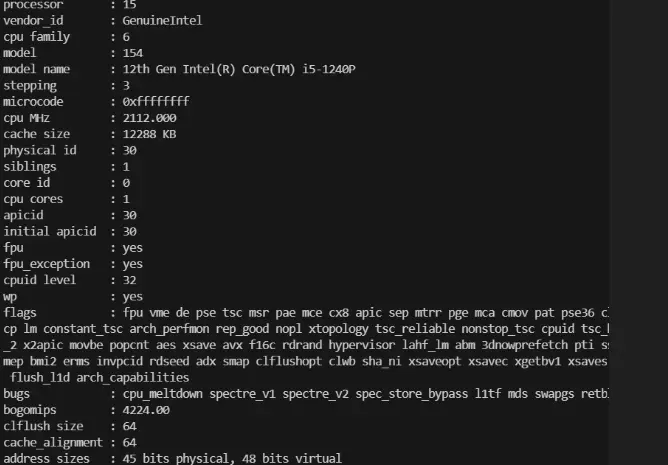
/proc/[PID]/ 进程详细信息(如 status、cmdline、fd)
内核版本和编译信息
root@ubuntu2204:~# cat /proc/version
Linux version 5.15.0-136-generic (buildd@lcy02-amd64-034) (gcc (Ubuntu 11.4.0-1ubuntu1~22.04) 11.4.0, GNU ld (GNU Binutils for Ubuntu) 2.38) #147-Ubuntu SMP Sat Mar 15 15:53:30 UTC 2025
网络流量信息 /proc/net/dev
root@ubuntu2204:~# cat /proc/net/dev
Inter-|   Receive                                                |  Transmit
 face |bytes    packets errs drop fifo frame compressed multicast|bytes    packets errs drop fifo colls carrier compressed
    lo: 7759911598 1360449    0    0    0     0          0         0 7759911598 1360449    0    0    0     0       0          0
 ens33: 417062256 3321954    0    0    0     0          0         0 7652714047 5639881    0    0    0     0       0          0
/proc/sys/ 目录,记录和修改内核参数配置,重要
root@ubuntu2204:~# ls /proc/sys
abi  debug  dev  fs  kernel  net  user  vm
/proc/loadavg 系统负载(1/5/15分钟平均负载,运行队列进程数)
root@ubuntu2204:~# cat /proc/loadavg
1.57 1.76 0.99 1/838 26242
/proc/stat cpu相关全局统计信息
root@ubuntu2204:~# cat /proc/stat
cpu  399417 4928 339405 84450316 7139 0 30675 0 0 0
cpu0 21195 2 26481 5268694 336 0 2800 0 0 0
cpu1 42402 74 31192 5240571 427 0 2972 0 0 0
cpu2 33478 15 27717 5257818 604 0 2324 0 0 0
cpu3 30995 406 23975 5226927 613 0 2168 0 0 0
cpu4 27296 404 20764 5284437 383 0 1675 0 0 0
cpu5 26414 890 21324 5267819 645 0 2164 0 0 0
cpu6 19211 24 31810 5251556 437 0 1526 0 0 0
cpu7 25022 1109 19356 5287793 316 0 1593 0 0 0
cpu8 23924 219 18628 5293679 500 0 1420 0 0 0
cpu9 21991 214 17550 5291998 484 0 1370 0 0 0
cpu10 22884 99 15854 5300435 359 0 1347 0 0 0
cpu11 18719 382 18216 5276030 425 0 4018 0 0 0
cpu12 20634 200 16434 5303424 502 0 1283 0 0 0
cpu13 22901 125 16799 5297069 354 0 1407 0 0 0
cpu14 20533 50 16129 5303203 375 0 1300 0 0 0
cpu15 21812 708 17170 5298855 370 0 1302 0 0 0
intr 42988264 23 45 0 0 0 0 0 0 0 0 0 0 216 0 0 0 256678 109314 1337306 1358118 0 0 0 0 0 0 0 0 0 0 0 0 0 0 0 0 0 0 0 0 0 0 0 0 0 0 0 0 0 0 0 0 0 0 0 0 0 26747 7701 0 0 0 0 0 0 0 0 0 0 0 0 0 0 0 0 0 0 0 0 0 0 0 0 0 0 0 0 0 0 0 0 0 0 0 0 0 0 0 0 0 0 0 0 0 0 0 0 0 0 0 0 0 0 0 0 0 0 0 0 0 0 0 0 0 0 0 0 0 0 0 0 0 0 0 0 0 0 0 0 0 0 0 0 0 0 0 0 0 0 0 0 0 0 0 0 0 0 0 0 0 0 0 0 0 0 0 0 0 0 0 0 0 0 0 0
/proc/sys/net 参数配置
网络参数 /proc/sys/net/ipv4/ip_forward 启用 IP 数据包转发(用于路由器或 VPN 服务器) 1启用
/proc/sys/net/core/somaxconn TCP 连接队列的最大长度 默认4096
/proc/sys/net/ipv4/tcp_max_syn_backlog SYN 队列长度(防御 SYN Flood 攻击) 默认512
/proc/sys/net/ipv4/tcp_tw_reuse 允许复用 TIME-WAIT 状态的端口(降低端口耗尽风险)建议开启(配置1
/proc/sys/net/ipv4/tcp_fin_timeout TIME-WAIT 状态超时时间(秒) 默认60
/proc/sys/net/core/rmem_max / wmem_max 接收/发送缓冲区最大大小(字节) 默认16M
/proc/sys/vm
/proc/sys/vm/swappiness 控制内核使用交换分区(Swap)的倾向(0=禁用,100=积极使用) 默认60
/proc/sys/vm/overcommit_memory 内存分配策略(0=启发式,1=总是允许,2=禁止超限) 默认0
/proc/sys/vm/dirty_ratio 内存中脏页占比阈值(触发同步写入磁盘) 默认20
/proc/sys/vm/dirty_background_ratio 后台刷脏页的阈值(异步写入) 默认10
/proc/sys/fs
/proc/sys/fs/file-max 系统最大可用fd数量 默认655360(高并发场景),linux 5.15 是9223372036854775807
/proc//
/proc/
/status 进程状态root@ubuntu2204:~# cat /proc/1/status
Name: systemd
Umask: 0000
State: S (sleeping)
Tgid: 1
Ngid: 0
Pid: 1
PPid: 0
TracerPid: 0
Uid: 0 0 0 0
Gid: 0 0 0 0
FDSize: 128
Groups:
NStgid: 1
NSpid: 1
NSpgid: 1
NSsid: 1
VmPeak: 231576 kB
VmSize: 166608 kB
VmLck: 0 kB
VmPin: 0 kB
VmHWM: 12008 kB
VmRSS: 12008 kB
RssAnon: 3596 kB
RssFile: 8412 kB
RssShmem: 0 kB
VmData: 19728 kB
VmStk: 132 kB
VmExe: 896 kB
VmLib: 9056 kB
VmPTE: 92 kB
VmSwap: 0 kB
HugetlbPages: 0 kB
CoreDumping: 0
THP_enabled: 1
Threads: 1
SigQ: 0/31167
SigPnd: 0000000000000000
ShdPnd: 0000000000000000
SigBlk: 7be3c0fe28014a03
SigIgn: 0000000000001000
SigCgt: 00000001000004ec
CapInh: 0000000000000000
CapPrm: 000001ffffffffff
CapEff: 000001ffffffffff
CapBnd: 000001ffffffffff
CapAmb: 0000000000000000/proc/
/stat 进程资源统计root@ubuntu2204:~# cat /proc/1/stat
1 (systemd) S 0 1 1 0 -1 4194560 21072 10673320 170 5762 93 710 123609 96361 20 0 1 0 139 170606592 3002 18446744073709551615 94801583210496 94801584125325 140737195847840 0 0 0 671173123 4096 1260 1 0 0 17 6 0 0 0 0 0 94801584520848 94801584840988 94802160250880 140737195851553 140737195851564 140737195851564 140737195851757 0/proc/
/exe 链接到进程的可执行文件地址root@ubuntu2204:~# ll /proc/1/exe
lrwxrwxrwx 1 root root 0 Apr 18 15:40 /proc/1/exe -> /usr/lib/systemd/systemd*/proc/
/limit 进程资源限制/proc/
/environ 进程使用的环境变量root@ubuntu2204:~# cat /proc/1/environ
HOME=/init=/sbin/initNETWORK_SKIP_ENSLAVED=TERM=linuxBOOT_IMAGE=/vmlinuz-5.15.0-136-genericdrop_caps=PATH=/usr/local/sbin:/usr/local/bin:/usr/sbin:/usr/bin:/sbin:/binPWD=/roo/proc/
/cwd 链接到进程的工作目录root@ubuntu2204:~# ll /proc/1/cwd
lrwxrwxrwx 1 root root 0 Apr 18 15:41 /proc/1/cwd -> ///proc/
/cgroup 进程的cgroup配置/proc//fd
进程打开的fd 可以用来衡量进程处理的网络链接(在read/write中,网络链接抽象成一个fd)
root@ubuntu2204:~# ll /proc/1/fd
total 0
dr-x------ 2 root root  0 Apr 18 15:40 ./
dr-xr-xr-x 9 root root  0 Apr 18 15:40 ../
lrwx------ 1 root root 64 Apr 18 15:40 0 -> /dev/null
lrwx------ 1 root root 64 Apr 18 15:40 1 -> /dev/null
lr-x------ 1 root root 64 Apr 20 03:17 10 -> /proc/1/mountinfo
lrwx------ 1 root root 64 Apr 19 00:55 100 -> 'socket:[68961]'
lrwx------ 1 root root 64 Apr 20 01:46 102 -> 'socket:[164205]'
lr-x------ 1 root root 64 Apr 20 03:17 11 -> anon_inode:inotify
lrwx------ 1 root root 64 Apr 18 15:40 12 -> 'socket:[59674]'
lr-x------ 1 root root 64 Apr 20 03:17 13 -> anon_inode:inotify
lr-x------ 1 root root 64 Apr 20 03:17 14 -> /proc/swaps
lrwx------ 1 root root 64 Apr 20 03:17 15 -> 'socket:[30476]'
lrwx------ 1 root root 64 Apr 20 03:17 16 -> 'socket:[30477]'
lrwx------ 1 root root 64 Apr 20 03:17 17 -> 'socket:[30478]'
lrwx------ 1 root root 64 Apr 20 03:17 18 -> 'socket:[30479]'
lrwx------ 1 root root 64 Apr 20 03:17 19 -> 'socket:[30480]'
lrwx------ 1 root root 64 Apr 18 15:40 2 -> /dev/null
lrwx------ 1 root root 64 Apr 18 15:40 20 -> 'socket:[30482]'
lrwx------ 1 root root 64 Apr 20 03:17 21 -> 'socket:[30483]'
lrwx------ 1 root root 64 Apr 20 03:17 25 -> 'socket:[28946]'
lr-x------ 1 root root 64 Apr 20 03:17 26 -> anon_inode:inotify
lr-x------ 1 root root 64 Apr 20 03:17 27 -> /dev/autofs
lr-x------ 1 root root 64 Apr 20 03:17 28 -> 'pipe:[30488]'
lrwx------ 1 root root 64 Apr 20 03:17 29 -> 'anon_inode:[timerfd]'
l-wx------ 1 root root 64 Apr 18 15:40 3 -> /dev/kmsg
lrwx------ 1 root root 64 Apr 18 15:40 30 -> /run/dmeventd-server|
lrwx------ 1 root root 64 Apr 20 03:17 31 -> /run/dmeventd-client|
lrwx------ 1 root root 64 Apr 20 03:17 32 -> 'socket:[30491]'
lrwx------ 1 root root 64 Apr 18 15:40 33 -> 'socket:[30493]'
sysfs 内存文件系统
挂载到/sys/fs
/sys/fs/cgroup/,管理cgroup,用于限制和监控进程的 CPU、内存、I/O 等资源。
/sys/fs/fuse/,管理 FUSE(用户态文件系统)的连接和参数。
/sys/fs/ext4/,管理ext4 文件系统的全局配置。
/sys/fs/overlayfs,OverlayFS(联合文件系统)的配置